


Switching to a cloud phone system UK is one of the smartest upgrades a UK business can make right now. Lower costs, better features, and a system that works wherever your team happens to be. But one question comes up more than any other: what happens to my existing phone number? The answer is simple. Your number does not change. Your customers keep dialling the same digits. What changes is where that number lives and how it connects to your team. This guide explains the whole process so you know exactly what to expect before, during, and after the switch.
Why Your Number Is Too Valuable to Change
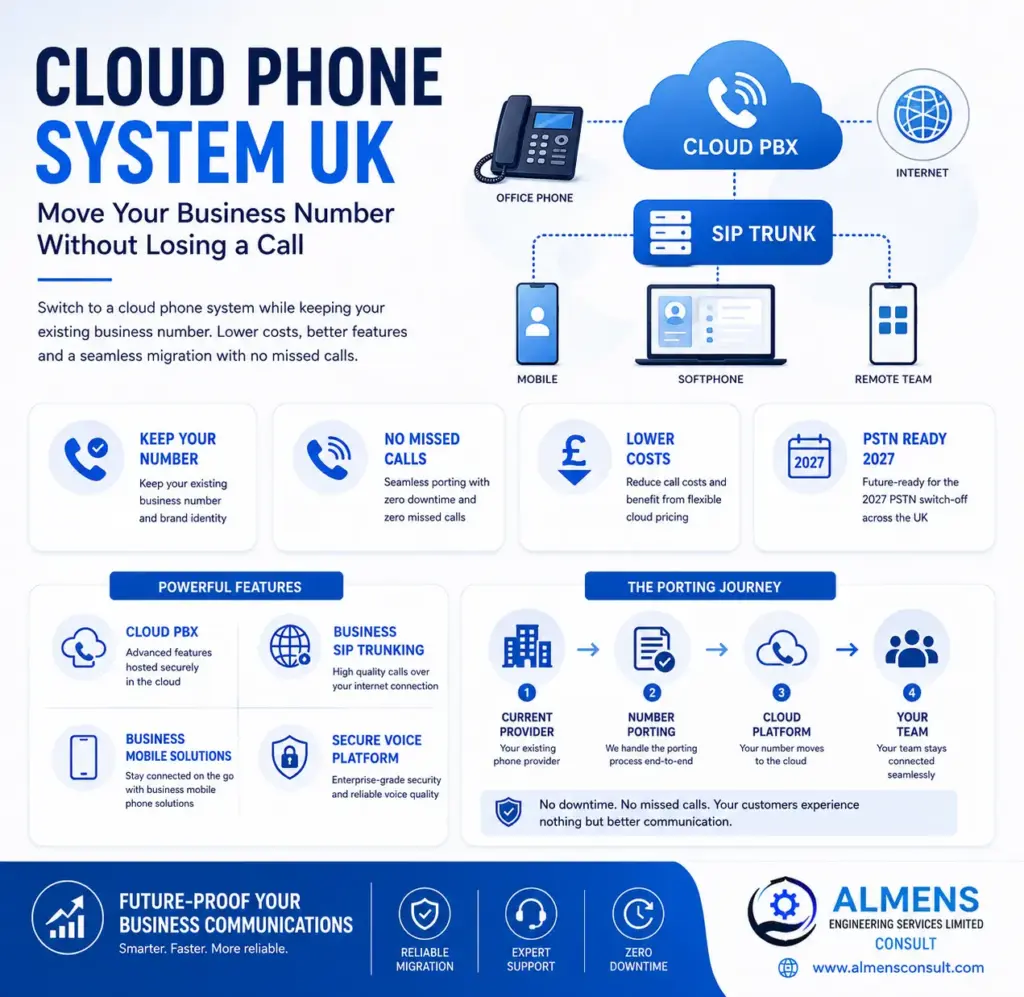
Your business phone number is woven into everything. It is on your website, your Google Business profile, your letterheads, email signatures, and in the contact lists of every customer who has ever called you. Changing it would mean updating dozens of touchpoints and, more importantly, risking that customers who call the old number simply cannot reach you. That is why number porting exists, and it is why every serious cloud phone system provider makes it a core part of the migration process.
Number porting transfers your existing telephone number from your current provider to the new cloud platform. The number itself stays the same. Your customers notice nothing. The only difference is that calls now route through a modern, flexible cloud based telephone system UK rather than ageing ISDN infrastructure.
How Number Porting Works
When you move to a cloud phone system, your new provider submits a porting request to your existing telephone provider. Ofcom regulations require all UK providers to release numbers when a valid request is submitted, so your current supplier cannot block or refuse the transfer. The number is then migrated to the cloud platform and starts routing calls through the new system from the moment porting completes.
During the porting period, which runs from five to fifteen working days depending on the number type, your existing lines continue working as normal. Calls arrive on your current system right up to the cutover point. At that moment they begin routing through the new cloud platform instead. There is no gap and no missed calls.
| Number Type | Typical Timeline | Key Point |
|---|---|---|
| Geographic (01 and 02) | 5 to 10 working days | Most common, straightforward process |
| Non-geographic (03) | 7 to 12 working days | Portable, handled the same way |
| Freephone (0800) | 7 to 15 working days | May need additional documentation |
| Mobile (07) | 1 to 5 working days | Fastest type to port |
| DDI ranges | 5 to 10 working days | Can port full range or individual numbers |
The Step-by-Step Migration Process
Audit Your Numbers First
Start by listing every telephone number your business uses. Main number, direct dial numbers for individual staff, any freephone lines, and numbers used in marketing campaigns. Your provider needs this complete picture to manage porting correctly from the start.
Check Your Current Contract
Look at your existing contract for notice periods and exit terms. Most business telephone contracts require 30 to 90 days notice. Your new provider will help you time the porting request correctly so it aligns with your notice period and avoids unnecessary overlap costs.
Your Provider Handles the Porting Request
Once your cloud phone system account is set up and your number list is confirmed, your provider submits the porting authorisation to your current supplier. You provide your account number, registered address, and a signed letter of authorisation. Your provider tracks the request and manages any communication with the losing provider on your behalf.
Your New System Is Built in Parallel
While porting is in progress, your cloud phone system UK platform is fully configured. Call flows, extensions, auto attendant menus, voicemail, hunt groups, and any integrations are all set up and tested using temporary numbers. By the time your real numbers switch over, everything is already working perfectly.
The Cutover
On the agreed porting date, your number moves to the new platform. The cutover happens at a specific time, typically early morning on a weekday. From that moment, calls route through the cloud system. Your team picks up as normal, with access to all the new features from day one.
What If Something Delays the Port?
Delays are uncommon but can happen if account details on the porting request do not match your current provider’s records, or if additional documentation is needed. A good provider monitors the process actively and contacts you straight away if anything needs resolving. The key point is that even if porting is delayed, your existing numbers keep working throughout. There is no scenario in a properly managed migration where your number goes offline.
SIP Trunking and Number Porting
For businesses using business SIP trunking phone systems rather than a fully hosted cloud PBX, number porting works in exactly the same way. Your SIP trunk provider takes ownership of your numbers and routes incoming calls to your IP PBX over the SIP connection. The caller experience is identical. Both SIP trunking and fully hosted cloud platforms support complete number porting and both are compliant with the 2027 PSTN switch-off requirements.
Your Number on Mobile: How Business Mobile Solutions Fit In
Once your number lives on a cloud phone system, it connects to more than just desk phones. Through business mobile solutions, your business number can ring simultaneously on desk phones, laptop softphones, and mobile apps. Your team answers calls on their smartphones using the company number, not a personal mobile. For businesses in London and across the UK, mobile phone business solutions London teams depend on mean that sales reps, account managers, and field staff are all reachable on the business number without carrying a separate work handset.
| Device | How It Receives Calls | Best For |
|---|---|---|
| Desk phone | Rings via cloud PBX extension | Office-based staff |
| Desktop softphone | App on laptop rings on business number | Home workers, hybrid staff |
| Mobile app | Business mobile app on smartphone | Field teams, travelling staff |
| All at once | Hunt group rings every device simultaneously | Making sure no call is ever missed |
Why Almens Consult Gets This Right
Almens Consult has managed number porting for UK businesses of every size, from sole traders with a single number to multi-site companies with large DDI ranges. Their team handles the entire process: checking your current contract terms, preparing porting documentation, submitting requests, tracking progress, and resolving any issues that arise. While porting is underway, they configure your complete cloud system in parallel so everything is ready on cutover day. By the time your numbers switch over, your team is trained, your call flows are tested, and your business mobile solutions are connected. No surprises, no downtime, and no lost calls.
Conclusion
Moving your number to a cloud phone system UK is a regulated, well-managed process that happens smoothly every day for businesses across the country. Your number does not change. Your customers are not affected. Your calls continue without interruption. What you gain on the other side is a modern cloud based telephone system UK that is cheaper to run, richer in features, ready for the 2027 PSTN switch-off, and capable of connecting your team whether they are at their desk, at home, or out with a client. The hardest part is choosing the right provider to manage it for you.